If you want to actually be good at video production, you need to learn about audio. Don’t just pass the buck off to “the sound guy” because one day, they are going to cancel on you and you’ll be doing all the sound by yourself! So to save you from making all kinds of sound recording mistakes for your film or video, here are my….
UNFORGIVABLE SINS OF AUDIO
By Dylan Couper of Gearbase Camera Rentals
Don’t look stupid on set! Memorize all these and then never ever do any of them, ever!
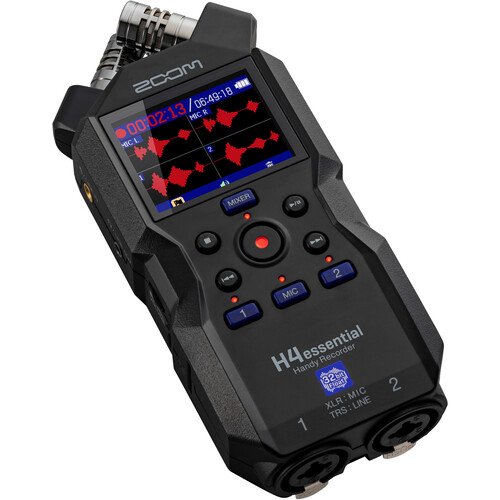
- Thinking because you hit REC on the recorder that you are recording! Usually when you hit REC on a camera, it starts recording instantly, right? Not always with audio recorders! While some do, a vast number will put you in STANDBY mode when you hit REC once. This standby mode is to let you look at the levels and hear the sound live through the speaker and only when you hit REC TWICE does it actually start recording. Train yourself to look for the time code rolling. If the numbers aren’t moving, you aren’t recording.
- Not using headphones and trusting any automatic mode and/or just watching the levels. This is as bad as filming with a camera and closing the LCD screen and trusting it to get a good shot without actually watching. You would never film anything without looking at a monitor, why would you ever record audio without listening to what you are recording? The auto gain control can’t tell if a lav mic is banging off someone’s necklace or scratching against a sweater. The levels won’t tell you how much an air conditioner is humming in the background. Always, always, always use headphones.
- Not having redundancy for live events. If you’re shooting a live event where you cannot fix sound in post, remember that batteries die live, wireless mics get interference, and tons of other things go wrong. Never shoot a live event without 2 or more systems – eventually on one shoot, one will fail and you’ll be really glad you have a backup. Personally, I like 3 mics if possible. 1 wireless lav per person, one shotgun per camera, and a hidden audio recorder like a Zoom as a worst case scenario mic. In fact, you should have a backup mic in your kit on set as well, just in case someone trashes your main mic, breaks a wire on a lav, etc. It happens.
- Not having spare batteries. Have triple the amount you think you need and buy quality! Some audio recorders will eat a set of cheap AA batteries with phantom power on in 5 minutes. I’ve seen people buy AA batteries from Dollarama that wouldn’t even power up a Zoom H4.
- Plugging inputs into outputs. We see this a lot with clients who are using a wireless lav mic, where they plug the mic into the receiver and then output the transmitter into the recorder and then think the gear is broken when there is no signal. You have to follow the signal from the source all the way to the end.
- Not listening to the background/natural noise/room tone. Our brain does a good job of filtering out sounds we don’t care about, but our world is much more loud than we think. Your mic however filters nothing and gets everything in its path. So that ticking clock on the wall behind the talent, or the freeway half a block away? Unless you actually LISTEN to the world around you, you might be in for a shock when you play it back later. Fluorescent office lights sound like BZZZZZZZZZZZZZZ on your track, just FYI. It’s YOU not the mic! Note, you must always record a good 30 seconds of silent room tone for your editor to use for covering gaffs in post.
- Cell phones and wireless mics. Cell phones should be OFF. NOT ON SILENT. Radio interference with wireless lav mics and cell phones is a real thing. If you hear TIC TIC TIC TIC in your audio, you’ll know why. Even on silent with vibration on, a good mic pointed the right direction will hear BZZZ BZZZ BZZZ. People should have them off while working anyway. Of course, in a live venue you don’t have control over this, which is why you’re going back to read the part about redundancy again.
- Using the wrong mic for the job or a built in mic. Good audio often comes down to environment and placement. The closer you can get the mic to the talent, the better audio you’re going to get. You may be shooting a conference with a $1500 shotgun mic from 30 feet away, but the person who put a $100 Zoom recorder on the podium is going to get better sound. And just so there is no doubt, all built in mics on cameras are bad. Built in mics on recorders are usually very good if you are close. But built in on camera mics? Forget it.
- Not getting your shotgun mic close enough (and placement in general). How close should your shotgun mic be? As close as can possibly be without being in frame. If the first AC comes over to you in a foul mood and swears they’ll kill you if you get in their frame…. YOU’RE DOING A GOOD JOB!!! If you haven’t scared the shit out of the camera team yet, you aren’t close enough! The optimum range is probably about 12” but we know that’s not possible on set. And to add to this, making sure your shotgun is pointed in the direction to minimize other sounds is critical as well. If talent is walking in high heels on a hardwood floor, you better be low down, pointing up and away from the clack clack sound on the floor! If someone is walking on carpet with HVAC above, you better be above, pointing down so you’re not getting the hum of the fans. And for the love of everything, make sure you have a headset on so you know if you’re producing any sounds from handling the boom as that’s totally unforgivable.
SLIGHTLY FORGIVABLE SINS
- Not knowing there are THREE types of 3.5mm ⅛” audio jacks. TS, TRS, TRRS. Tip (or tail)l/Ring/Sleeve. ¼” plugs (like for a guitar) use the same system as do 2.5mm plugs (which you’ll almost never see). So… TS is a single mono audio channel with 2 rings, one tip, one sleeve. TRS adds a middle ring to conduct a second audio channel. This is your common Left/Right stereo plug like on an OG MP3 player or to output from your computer to basic speakers. TRRS adds a 2nd middle ring, which is used for a microphone input, so it has 2 audio output channels and 1 input mic channel. Cell phones until we went to all USB used to have these so you could plug in a wired headset. Laptops generally have these. Desktops sometimes have both TRS for stereo output, TS for a single mic in and TRRS for headset in/out. Here’s the important part… THEY ARE NOT ALL COMPATIBLE!!! If you use a TRRS plug into a TS input, the microphone ring is going to overlap with one of the input rings and you’re either going to get a huge buzz or you’re going to get nothing!!! You need to look at what you’re actually plugging in to what and make sure you have the right adapters. You’ll very rarely see a TS connection in video production, you mostly have to watch out for using TRRS in TRS connections and vice versa.
- Not setting inputs and outputs on wireless lav mics, and then not setting levels on the camera, and in this order.
- Setting Mic vs Line inputs. A mic puts out a very low signal, which the preamps in your camera or recorder will boost. An audio device (think stereo amp/music player, etc) puts out a much higher level. Make sure you set your input to the right one.
- Thinking Phantom Power is just a Tragically Hip album… Professional condenser mics require power. Some have built in AA batteries, some require “phantom power” which is power that your camera or recorder can supply via XLR cable to power the mic indefinitely. This is usually labeled as +48V on the camera/recorder. Note that connections like 3.5mm cannot transmit phantom power, so if you’re using something like a Rode NTG3 with an XLR to 3.5mm adapter into your camera, it will not work and you’ll look really really bad for not knowing that. But now you do.
- Not knowing what a “bright” vs “cozy” room is. These are slang terms for how the room you are in bounces sound waves around. A “bright” room is one that might have hard tile floors, flat open stone walls etc which bounces sound waves around like crazy, including back into your mic. A “cozy” room would be one that has carpeting, lots of bookshelves or curtains, a soft panel ceiling, basically things that absorb all the sound waves. The ultimate would be a 70’s style room with shag carpet that runs up the walls AND the ceiling! This is why sound people bring stacks of blankets with them, to try to cut down areas where soundwaves will bounce back to give a cleaner sound overall.
- Using cheap gear. Yes, this is a tough one as everything is expensive these days and some brands have brought out a lot of very low cost but still reasonably decent mics. These are totally fine for a lot of things, corporate talks, interviews, podcasts, etc… But if you’re producing a film, where the audience will be 100% dialed in, the cost of renting a high end mic and recorder is some of the best money you can spend because when it’s played in a theater instead of a cell phone, the audience WILL hear the difference.
- Removing an SD card or powering something off while anything is still writing to the card. This is a RARE one… but it will ruin you. After you stop recording, devices can still take a bit of time to finish writing to a card. Make sure everything is stopped before you power off. Having said that, if your batteries die in a recorder while it is still recording, you’ll likely lose the entire take. See what we said about batteries? Put a fresh set in before any really long take (like a convention shoot). This is true with video cameras as well. If you pop the battery out of a camera while it’s accessing an SD card, there’s a good chance the card will corrupt. Goodbye all your footage, hello expensive recovery service!
- Not Slating… Ahhhh… this isn’t as bad as it used to be thanks to sync software. Still, it sure doesn’t hurt to do a quick clap for a nice sync point. It’s free and fast. Buy a cheap slate and do it anyway and at least you’ll look pro and that goes a long way sometimes on set or with a client.
- Not using 32 bit float recording If you have it. This is a complete game changer, and with memory cards so cheap, there’s very little excuse to not be using 32 bit float recording and get the most possible dynamic range that you can so nothing gets clipped. If you don’t know what this is, you should go google it and watch a tutorial on it.
And remember…. Practice is free. ADR isn’t.